Ansible Full Course - Zero to Hero in 15 Chapters (Install, Inventory, SSH Keys, YAML, Playbooks, Handlers, Variables, Conditionals, Roles, Jinja2 Templates, Error Handling, Vault, Deploy a Website) - Companion Guide with Timestamps
This is the companion page to my Ansible Full Course - Zero to Hero, a free three-hour-twenty-minute video that takes you from "what is Ansible" to deploying a website with roles, templates, handlers and a vault-encrypted secret. The video is the course; this page is what the video cannot be - searchable, copy-pasteable and kept current. For every chapter you get the timestamp, the commands and YAML I type on screen, the link to the detailed blog post where one exists, and the page of the official Ansible documentation to read next.
I recorded the course on Ansible 9 / ansible-core 2.16. At the time of this update the current release is the Ansible 14 community package with ansible-core 2.21, which needs Python 3.12 or newer on the control node (release and maintenance). Nothing in the course breaks - Ansible's YAML has been remarkably stable - and where a command or default changed I say so in the chapter.
Table of Content
- How to use this course
- Chapter 1 - Introduction to Ansible (00:00)
- Chapter 2 - Ansible's stateless nature (12:56)
- Chapter 3 - Project structure (24:22)
- Chapter 4 - SSH key management (37:36)
- Chapter 5 - YAML and Ansible (43:45)
- Chapter 6 - Handlers (50:43)
- Chapter 7 - Variables (1:00:44)
- Chapter 8 - Environment variables (1:26:00)
- Chapter 9 - Conditionals (1:33:55)
- Chapter 10 - Roles and tasks (1:51:55)
- Chapter 11 - Jinja2 templates (1:58:29)
- Chapter 12 - Active-passive deployment (2:10:14)
- Chapter 13 - Error handling (2:20:36)
- Chapter 14 - Ansible Vault (2:35:05)
- Chapter 15 - Project: deploy a website (2:55:18)
- What to learn after the course
1. How to use this course
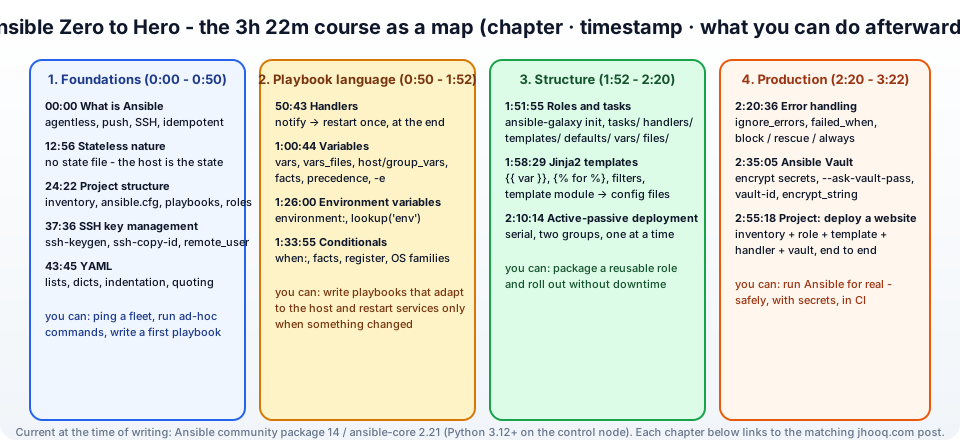
The course is four parts - foundations (chapters 1-5), the playbook language (6-9), structure (10-12) and production (13-15) - and it is hands-on from chapter 3. You need -
- A control node - your laptop (macOS, Linux, or WSL on Windows) with Ansible installed: install Ansible on macOS, Windows, Ubuntu and Fedora.
pipx install --include-deps ansibleis the recommended way now; ifansibleis then "command not found" in zsh, this fix. - Two or three managed nodes - Vagrant VMs, EC2 instances (launch one here) or any Linux boxes you can SSH into. Managed nodes need only Python and SSH - no agent.
- The repository with all the playbooks from the course is linked under the video.
Watch a chapter, then do it on your own machines before the next one - that order is the whole trick.
2. Chapter 1 - Introduction to Ansible (00:00)
What Ansible is - an open-source automation tool that configures servers, deploys applications and orchestrates tasks by connecting to machines over SSH and running small Python modules on them. Three properties define it -
- Agentless - nothing to install on the servers beyond Python and SSH; compare Puppet and Chef agents.
- Declarative and idempotent - you describe the desired state (
package nginx is present), and running the playbook twice changes nothing the second time. - Push-based - the control node pushes changes when you run it; there is no central server polling.
The first commands of the course -
1ansible --version
2ansible all -i inventory.ini -m ping                 # the ping module: "can I SSH and run Python?"
3ansible all -i inventory.ini -m shell -a "uptime"    # ad-hoc command on every host
4ansible-doc -l | wc -l                               # thousands of modules
Read next: why Ansible is the ultimate tool for DevOps teams and the official getting started guide.
3. Chapter 2 - Ansible's stateless nature (12:56)
Terraform keeps a state file; Ansible keeps nothing. Every run, each module inspects the host (facts, the current package list, the file's checksum), compares with what the task asks for, and changes only the difference - then reports ok or changed. Consequences the chapter walks through -
- There is no "drift" problem and no state to lock or lose - the server is the state.
- You can run the same playbook against a fresh server and a five-year-old one.
- The price is that Ansible cannot know what it created last time - deleting a resource means writing a task with
state: absent; renaming a file means two tasks. --check(dry run) and--diffshow what would change, which is how you review a playbook safely.
1ansible-playbook site.yml --check --diff
The comparison with Terraform - which is the right tool for provisioning the servers that Ansible then configures - is a theme of my Terraform series.
4. Chapter 3 - Project structure (24:22)
The layout the course uses, which is the layout the Ansible best-practices docs recommend -
 1ansible-project/
 2├── ansible.cfg            # defaults: inventory path, remote_user, host_key_checking
 3├── inventory/
 4│   ├── hosts.ini          # or hosts.yml - the servers, in groups
 5│   ├── group_vars/
 6│   │   └── webservers.yml # variables for a whole group
 7│   └── host_vars/
 8│       └── web1.yml       # variables for one host
 9├── playbooks/
10│   └── site.yml           # the entry point
11└── roles/
12    └── nginx/             # reusable units (chapter 10)
The inventory is the list of machines and their groups -
 1[webservers]
 2web1 ansible_host=10.0.1.10
 3web2 ansible_host=10.0.1.11
 4
 5[dbservers]
 6db1 ansible_host=10.0.11.20
 7
 8[all:vars]
 9ansible_user=ubuntu
10ansible_ssh_private_key_file=~/.ssh/jhooq-key.pem
The hosts, inventory, roles and tasks vocabulary is explained with examples in demystifying hosts, inventory, roles and tasks, and the full reference is how to build your inventory. Targeting a subset of the inventory - one host, one group, a pattern - is the --limit flag.
5. Chapter 4 - SSH key management (37:36)
Ansible authenticates like you do - with an SSH key. The chapter sets up key-based access so that no playbook ever asks for a password -
1ssh-keygen -t ed25519 -f ~/.ssh/ansible -C "ansible control node"
2ssh-copy-id -i ~/.ssh/ansible.pub ubuntu@10.0.1.10      # once per host (or bake the key into the image / cloud-init)
3ansible all -m ping --private-key ~/.ssh/ansible -u ubuntu
In ansible.cfg you make it permanent -
1[defaults]
2inventory = inventory/hosts.ini
3remote_user = ubuntu
4private_key_file = ~/.ssh/ansible
5host_key_checking = False      # labs only - keep it on in production and manage known_hosts
For sudo, become: true in the play (and --ask-become-pass if the user needs a password). The dedicated post is how to use SSH keys with Ansible for secure server management; on AWS the same key pair you created in launch an EC2 instance works directly.
6. Chapter 5 - YAML and Ansible (43:45)
Playbooks are YAML, so the chapter spends ten minutes on the four things that cause 90% of YAML errors - indentation (two spaces, never tabs), lists (- item), dictionaries (key: value), and quoting (anything starting with {{ must be quoted: msg: "{{ name }}"). The first real playbook -
 1---
 2- name: Install and start nginx
 3  hosts: webservers
 4  become: true
 5
 6  tasks:
 7    - name: Install nginx
 8      ansible.builtin.apt:
 9        name: nginx
10        state: present
11        update_cache: true
12
13    - name: Make sure nginx is running
14      ansible.builtin.service:
15        name: nginx
16        state: started
17        enabled: true
1ansible-playbook playbooks/site.yml
Note the fully qualified collection names - ansible.builtin.apt instead of apt - which the docs have used since ansible-core 2.10 and which avoid ambiguity once you install collections. I wrote up the YAML rules with more examples in why YAML is so important in Ansible; the reference is the YAML syntax appendix. yamllint and ansible-lint catch the rest.
7. Chapter 6 - Handlers (50:43)
A handler is a task that runs only when another task notifies it, and only once at the end of the play even if ten tasks notified it - the standard way to restart a service after its config changed and not otherwise -
 1  tasks:
 2    - name: Deploy nginx config
 3      ansible.builtin.template:
 4        src: nginx.conf.j2
 5        dest: /etc/nginx/nginx.conf
 6      notify: Restart nginx
 7
 8  handlers:
 9    - name: Restart nginx
10      ansible.builtin.service:
11        name: nginx
12        state: restarted
The chapter covers meta: flush_handlers to run them mid-play, listen for one notification to trigger several handlers, and the fact that a failed later task means handlers never run (use --force-handlers). I have a full post with the lifecycle diagram - Ansible handlers explained - and the official handlers page.
8. Chapter 7 - Variables (1:00:44)
The longest chapter, because variables are where playbooks become reusable. Where variables can come from, in rising precedence -
- role
defaults/main.yml(lowest - meant to be overridden) - inventory
group_vars/all, thengroup_vars/<group>, thenhost_vars/<host> - play
vars:andvars_files: - role
vars/main.yml - task
vars: set_fact/registerresults-e/--extra-varson the command line (highest)
 1- name: Variables demo
 2  hosts: webservers
 3  vars:
 4    http_port: 80
 5    packages:
 6      - nginx
 7      - git
 8
 9  tasks:
10    - name: Install packages
11      ansible.builtin.apt:
12        name: "{{ packages }}"
13        state: present
14
15    - name: Capture the nginx version
16      ansible.builtin.command: nginx -v
17      register: nginx_version
18      changed_when: false
19
20    - name: Show it
21      ansible.builtin.debug:
22        msg: "{{ nginx_version.stderr }} on {{ ansible_facts['distribution'] }} {{ ansible_facts['distribution_version'] }}"
ansible_facts (gathered automatically at the start of the play - gather_facts: true) are variables too: OS, IPs, memory, disks. ansible -m setup web1 shows them all. Full precedence list and the string/list/dict handling are on the variables page.
9. Chapter 8 - Environment variables (1:26:00)
Two directions - setting environment variables for the commands a task runs, and reading them from the control node -
 1  tasks:
 2    - name: Run a build behind the corporate proxy
 3      ansible.builtin.shell: pip install -r requirements.txt
 4      environment:
 5        HTTPS_PROXY: "http://proxy.company.com:8080"
 6        PIP_CERT: /etc/ssl/certs/company-ca.pem
 7
 8    - name: Read a variable from the machine running ansible
 9      ansible.builtin.debug:
10        msg: "Deploying as {{ lookup('env', 'USER') }}"
environment: can also sit at the play level for every task. The proxy example is the same corporate-proxy situation as in my pip SSL certificate post. Reference: setting the remote environment.
10. Chapter 9 - Conditionals (1:33:55)
when: decides whether a task runs, using Jinja2 expressions without the braces -
 1  tasks:
 2    - name: Install on Debian family
 3      ansible.builtin.apt:
 4        name: nginx
 5        state: present
 6      when: ansible_facts['os_family'] == "Debian"
 7
 8    - name: Install on RedHat family
 9      ansible.builtin.dnf:
10        name: nginx
11        state: present
12      when: ansible_facts['os_family'] == "RedHat"
13
14    - name: Check if the app is already deployed
15      ansible.builtin.stat:
16        path: /opt/app/current
17      register: app
18
19    - name: First-time setup
20      ansible.builtin.include_tasks: first-time.yml
21      when: not app.stat.exists
22
23    - name: Only on the primary, only in prod
24      ansible.builtin.command: /opt/app/migrate
25      when:
26        - inventory_hostname == groups['webservers'][0]
27        - env == "prod"
A list under when: is an AND. Combine with register, failed_when, changed_when and loop (the chapter shows when inside a loop evaluating per item). Reference: conditionals and loops.
11. Chapter 10 - Roles and tasks (1:51:55)
A role is a playbook fragment packaged in a fixed directory layout so it can be reused and shared -
1ansible-galaxy role init roles/nginx
1roles/nginx/
2├── defaults/main.yml    # overridable variables
3├── vars/main.yml        # fixed variables
4├── tasks/main.yml       # the tasks
5├── handlers/main.yml    # the handlers
6├── templates/           # Jinja2 templates (chapter 11)
7├── files/               # static files for copy
8└── meta/main.yml        # dependencies, Galaxy metadata
1# playbooks/site.yml
2- hosts: webservers
3  become: true
4  roles:
5    - nginx
6    - role: app
7      vars:
8        app_version: "2.4.1"
Tasks inside the role reference templates/ and files/ by name, so the role is self-contained. Thousands of community roles and collections are on Ansible Galaxy (ansible-galaxy install geerlingguy.nginx). Deep dive: hosts, inventory, roles and tasks and roles in the docs.
12. Chapter 11 - Jinja2 templates (1:58:29)
Config files differ per host; a template renders them from variables -
 1# roles/nginx/templates/site.conf.j2
 2server {
 3    listen {{ http_port }};
 4    server_name {{ inventory_hostname }} {{ ansible_facts['default_ipv4']['address'] }};
 5
 6    {% for location in app_locations %}
 7    location {{ location.path }} {
 8        proxy_pass http://127.0.0.1:{{ location.port }};
 9    }
10    {% endfor %}
11
12    {% if enable_gzip | default(true) %}
13    gzip on;
14    {% endif %}
15}
1    - name: Render the site config
2      ansible.builtin.template:
3        src: site.conf.j2
4        dest: /etc/nginx/sites-available/{{ app_name }}.conf
5        mode: "0644"
6        validate: nginx -t -c %s
7      notify: Reload nginx
validate runs a check before replacing the file - a safety net the chapter emphasises. Filters (| default(), | upper, | to_nice_yaml, | ipaddr) do the formatting. References: templating and the template module; the Terraform equivalent is in Terraform templatefile.
13. Chapter 12 - Active-passive deployment (2:10:14)
How do you upgrade a cluster without downtime? Ansible's answer is serial - process hosts in batches - plus a load balancer step -
 1- hosts: webservers
 2  serial: 1                     # one host at a time (or "50%", or [1, 3, 5])
 3  max_fail_percentage: 0        # abort the whole run if any host fails
 4  become: true
 5
 6  pre_tasks:
 7    - name: Take the host out of the load balancer
 8      ansible.builtin.command: /usr/local/bin/lb-disable {{ inventory_hostname }}
 9      delegate_to: localhost
10
11  roles:
12    - app
13
14  post_tasks:
15    - name: Wait for the app to answer
16      ansible.builtin.uri:
17        url: "http://{{ ansible_host }}:8080/health"
18        status_code: 200
19      retries: 10
20      delay: 3
21      register: health
22      until: health.status == 200
23
24    - name: Put the host back
25      ansible.builtin.command: /usr/local/bin/lb-enable {{ inventory_hostname }}
26      delegate_to: localhost
With two groups (active and passive) you can also switch all traffic to the passive side, upgrade the active side, and switch back - the pattern the chapter demonstrates. On AWS the "lb-disable" step is deregistering the target from the target group (Auto Scaling and ALB). Reference: controlling where tasks run and rolling updates.
14. Chapter 13 - Error handling (2:20:36)
By default a failed task stops the play for that host. The tools to decide otherwise -
 1  tasks:
 2    - name: This may fail and that is fine
 3      ansible.builtin.command: /opt/app/optional-step
 4      ignore_errors: true
 5
 6    - name: Define failure yourself
 7      ansible.builtin.command: /opt/app/status
 8      register: status
 9      failed_when: "'DOWN' in status.stdout"
10      changed_when: false
11
12    - name: Try / catch / finally
13      block:
14        - name: Deploy the new version
15          ansible.builtin.command: /opt/app/deploy {{ app_version }}
16      rescue:
17        - name: Roll back
18          ansible.builtin.command: /opt/app/rollback
19        - name: Tell the team
20          ansible.builtin.debug:
21            msg: "Deploy of {{ app_version }} failed on {{ inventory_hostname }}, rolled back"
22      always:
23        - name: Clean temp files
24          ansible.builtin.file:
25            path: /tmp/deploy
26            state: absent
Plus any_errors_fatal: true at the play level and retries/until on flaky tasks. Two real errors from the course and the blog: unable to start service apache2 and git clone destination path already exists. Reference: error handling in playbooks and blocks.
15. Chapter 14 - Ansible Vault (2:35:05)
Passwords and keys must not sit in Git in plain text. Vault encrypts files or single values with a password -
 1# encrypt a whole vars file
 2ansible-vault create group_vars/all/vault.yml          # opens an editor; store db_password: ...
 3ansible-vault edit group_vars/all/vault.yml
 4ansible-vault encrypt existing-secrets.yml
 5ansible-vault view group_vars/all/vault.yml
 6
 7# encrypt one value and paste it into a normal vars file
 8ansible-vault encrypt_string 'S3cret!' --name db_password
 9
10# run with the vault password
11ansible-playbook site.yml --ask-vault-pass
12ansible-playbook site.yml --vault-password-file ~/.vault_pass      # chmod 600, never committed
13ansible-playbook site.yml --vault-id prod@~/.vault_prod --vault-id dev@~/.vault_dev
Convention from the course: keep vault.yml next to a plain vars.yml that references the vaulted variables (db_password: "{{ vault_db_password }}"), so grep still finds where a variable is used. In CI the vault password comes from the CI secret store - and the natural upgrade is pulling secrets from Vault or AWS Secrets Manager with lookups. Reference: the Vault guide.
16. Chapter 15 - Project: deploy a website (2:55:18)
Everything together: an inventory with webservers, a nginx role with a templated site config and a reload handler, an app role that clones the site from a Git repository (public or private, with a deploy key from Vault), conditionals for Debian vs RedHat, serial: 1, and a block/rescue around the deploy -
 1# playbooks/deploy-website.yml
 2- name: Deploy the jhooq website
 3  hosts: webservers
 4  become: true
 5  serial: 1
 6  vars_files:
 7    - ../group_vars/all/vault.yml
 8
 9  roles:
10    - nginx
11    - { role: app, vars: { repo: "git@github.com:rahulwagh/website.git", version: "main" } }
1ansible-playbook playbooks/deploy-website.yml --vault-password-file ~/.vault_pass --diff
Run it twice - the second run is all ok, zero changed - and you have understood idempotency, which is the real graduation test of the course.
17. What to learn after the course
- Collections and Galaxy -
requirements.yml,ansible-galaxy collection install amazon.aws, and the cloud modules that create EC2 instances, S3 buckets and security groups from Ansible. - Dynamic inventory - the
amazon.aws.aws_ec2plugin so the inventory is your AWS account, grouped by tag. - ansible-lint and Molecule - lint playbooks, test roles in containers.
- Ansible + Terraform - Terraform builds the servers (Terraform EC2), Ansible configures them; the Terraform provisioner post shows the hand-off.
- Kubespray - a production Kubernetes installer written entirely in Ansible, and the best large real-world playbook to read: install Kubernetes with Kubespray.
- AWX / Ansible Automation Platform - a web UI, scheduling and RBAC on top of the same playbooks.
All my Ansible posts are listed on the Ansible table of content, and the official documentation index is docs.ansible.com.