fatal: destination path already exists and is not an empty directory - Ansible git module, 4 Fixes (and Proof That force=yes Is Not One of Them)

TL;DR
- The message is git's, not Ansible's.
ansible.builtin.gitrunsgit cloneon the remote host, and git refuses to clone into a directory that already has files. The module reports it asFAILED! => {"cmd": "/usr/bin/git clone --origin origin <repo> <dest>", "msg": "fatal: destination path '<dest>' already exists and is not an empty directory.", "rc": 128}. force: yesdoes not fix it. I ran the same task withforce=yeson ansible-core 2.21.4 and got the identical error.forceonly applies whendestis already a git repository with local changes.- The fixes: remove the directory with the
filemodule and clone (first runchanged=2, second runok=1 changed=0), clone into a freshdestor a subdirectory (dest: /tmp/app/srcworked around the leftover file), orstatfordest/.gitand clean up only when the directory is not a repository. - A second run on a real clone is fine: the module fetches and reports
ok, not an error. The error only means "files, but not a clone of this repo". - Use an absolute
dest; a relative one resolves against the remote user's home directory. - Every output below is from ansible-core 2.21.4 on Ubuntu 24.04, captured on 2026-10-12.
- Not your exact case? The closest post on this site is How to Use SSH Keys with Ansible for Secure Server Management?.
I got this error when I was trying to do a git clone on a remote machine using Ansible, and the error message was destination path already exists and is not an empty directory -

1TASK [Read-write git checkout from github] *************************************
2fatal: [35.204.184.224]: FAILED! => {"changed": false, "cmd": "/usr/bin/git clone --origin origin https://github.com/rahulwagh/python-example.git /home/ubuntu/basic-http-server",
3"msg": "fatal: destination path '/home/ubuntu/basic-http-server' already exists and is not an empty directory.", "rc": 128, "stderr": "fatal: destination path '/home/ubuntu/basic-http-server' already exists and is not an empty directory.\n"}
That was 2023. Here is the same error as ansible-core 2.21.4 prints it today, reproduced on 2026-10-12 with a directory that contains one leftover file and no .git -
 1$ ansible localhost -m ansible.builtin.git -a "repo=https://github.com/rahulwagh/vpc-subnet-planner.git dest=/tmp/app version=main"
 2[ERROR]: Task failed: Module failed: fatal: destination path '/tmp/app' already exists and is not an empty directory.
 3Origin: <adhoc 'ansible.builtin.git' task>
 4
 5localhost | FAILED! => {
 6    "changed": false,
 7    "cmd": "/usr/bin/git clone --origin origin https://github.com/rahulwagh/vpc-subnet-planner.git /tmp/app",
 8    "msg": "fatal: destination path '/tmp/app' already exists and is not an empty directory.",
 9    "rc": 128,
10    "stderr": "fatal: destination path '/tmp/app' already exists and is not an empty directory.\n",
11    "stdout": ""
12}
The cmd line is the tell: the module decided to clone, not fetch, which means it did not find a usable .git in dest. rc: 128 is git's exit code for a fatal error, and ansible-playbook itself then exits with code 2.
In this post we will look at why the git module throws this error, how to confirm what is sitting in the destination directory, and the four ways to fix it depending on what you actually want to happen with that directory.
Table of Content
- Why does the Ansible git module throw this error?
- Confirm what is in the dest directory
- Fix 1 - Remove the directory first with the file module (clean clone)
- Fix 2 - Clone into a fresh dest directory
- Fix 3 - Check with stat and only clone when there is no repository yet
- Fix 4 - force: yes, when the directory is a repo with local changes
- The same error with the copy and file module
- A complete, idempotent git clone task
- What broke when I ran this
- Conclusion
What is in dest | What the module runs | Result |
|---|---|---|
| nothing, or an empty directory | git clone | changed: true |
a .git whose origin is repo | git fetch + checkout of version | ok (or changed if the checkout moved) |
a .git whose origin is a different repository | git clone | this error |
files but no .git | git clone | this error, rc: 128 |
| the right repository with local edits | checkout refused unless force: yes | Local modifications exist in the destination |
1. Why does the Ansible git module throw this error?
The ansible.builtin.git module does not do anything magic. On the remote host it runs plain git commands, and the error message you see is git's own message from git clone. Git refuses to clone into a directory that already has files in it, because it does not want to overwrite your work.
So the module looks at dest and makes a decision -
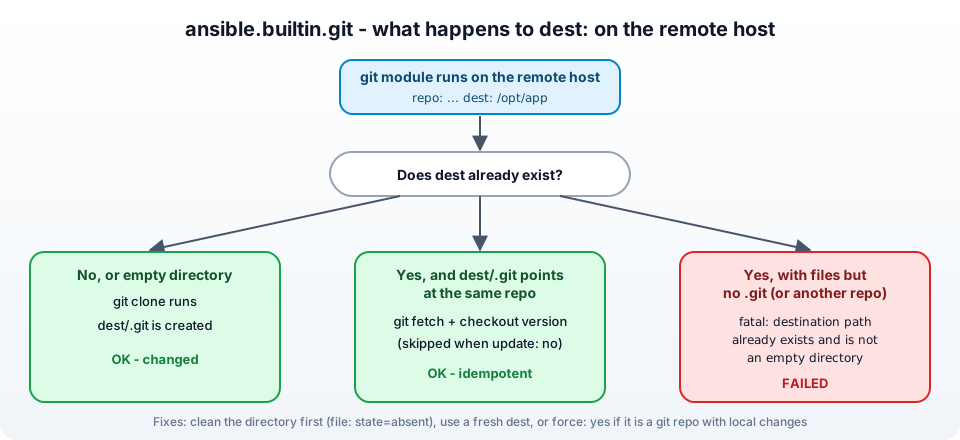
destdoes not exist, or is an empty directory - the module runsgit clone. Success.destexists and contains a.gitdirectory pointing at the samerepo- the module runsgit fetchand checks out the requestedversion. This is the idempotent, "run it again every day" path.destexists and has files but no.git, or a.gitfrom a different repository - the module triesgit clone, git refuses, and you get destination path already exists and is not an empty directory.
In my case it was the third one. My destination directory ./basic-http-server already existed because an earlier, broken playbook run had copied some files into it. Later I also hit it with a .git directory that belonged to a different remote URL - the module compares the origin remote with repo, and when they do not match it falls back to cloning.
1- name: Read-write git checkout from github
2  ansible.builtin.git:
3    repo: https://github.com/rahulwagh/python-example.git
4    dest: ./basic-http-server
Note - a relative
destlike./basic-http-serveris resolved relative to the remote user's home directory, not relative to your playbook. Always use an absolute path such as/home/ubuntu/basic-http-serveror/opt/appto avoid surprises.
2. Confirm what is in the dest directory
Before deleting anything, look at what is actually there. You can do it with an ad-hoc Ansible command without logging in by hand -
1# list the directory on the remote host (replace the host and path)
2ansible 35.204.184.224 -i inventory/hosts -m shell -a "ls -la /home/ubuntu/basic-http-server"
3
4# is it a git repo, and which remote does it point to?
5ansible 35.204.184.224 -i inventory/hosts -m shell -a "cd /home/ubuntu/basic-http-server && git remote -v"
Or by hand on the host -
1cd /home/ubuntu/basic-http-server
2ls -lart
3git remote -v      # "fatal: not a git repository" means there is no .git
Running the playbook with -vvv also shows you the exact git command the module executed, which is how I found out it was trying to clone and not fetch.
Three possible findings, and each has its own fix -
- Leftover files, no
.git- use Fix 1 or Fix 2. - A
.gitfrom another repository - Fix 1. - The right repository, but with uncommitted local changes and the module refuses to update - Fix 4.
3. Fix 1 - Remove the directory first with the file module (clean clone)
If the directory holds nothing you care about, delete it and let the git module clone fresh. Do it in the playbook with the file module, so the fix is repeatable and nobody has to SSH in -
 1- name: Remove the stale checkout directory
 2  ansible.builtin.file:
 3    path: /home/ubuntu/basic-http-server
 4    state: absent
 5
 6- name: Clone the repository
 7  ansible.builtin.git:
 8    repo: https://github.com/rahulwagh/python-example.git
 9    dest: /home/ubuntu/basic-http-server
10    version: main
This is how I originally fixed it, except I did it by hand -
- Go inside the destination directory where you are trying to clone the repo -
1# Put the name of the destination directory
2
3cd NAME_OF_DESTINATION_DIRECTORY
- Run the following list command to view the content of the directory -
1ls -lart
- Remove the stale .git directory (or the whole directory) -
1rm -rf .git
- After removing it, re-run the ansible-playbook and it succeeds.
This is what the two-task version prints on the first run, and then what the plain clone task prints on the next run against the clone it just made -
 1$ ansible-playbook /tmp/clone2.yml
 2TASK [Remove whatever is at the destination] ***********************************
 3changed: [localhost]
 4
 5TASK [Clone the app] ***********************************************************
 6changed: [localhost]
 7
 8PLAY RECAP *********************************************************************
 9localhost                  : ok=2    changed=2    unreachable=0    failed=0    skipped=0    rescued=0    ignored=0
10
11$ ansible-playbook /tmp/clone.yml
12TASK [Clone the app] ***********************************************************
13ok: [localhost]
14
15PLAY RECAP *********************************************************************
16localhost                  : ok=1    changed=0    unreachable=0    failed=0    skipped=0    rescued=0    ignored=0
The downside of the playbook version is that it deletes and re-clones on every run, which is slow and not idempotent. Fine for a one-off repair, not for a playbook you run every deployment. For that, use Fix 3.
4. Fix 2 - Clone into a fresh dest directory
The simplest fix of all when you do not control the existing directory - clone somewhere else. A common pattern is one directory per version or per build, with a symlink that points at the current one -
 1- name: Clone the release into its own directory
 2  ansible.builtin.git:
 3    repo: https://github.com/rahulwagh/python-example.git
 4    dest: "/opt/app/releases/{{ app_version }}"
 5    version: "{{ app_version }}"
 6
 7- name: Point /opt/app/current at the new release
 8  ansible.builtin.file:
 9    src: "/opt/app/releases/{{ app_version }}"
10    dest: /opt/app/current
11    state: link
Nothing ever clones into a non-empty directory, and rolling back is a symlink change. The minimal form of this fix is a subdirectory: with the leftover README.txt still sitting in /tmp/app, cloning into /tmp/app/src just works -
 1$ ansible localhost -m ansible.builtin.git -a "repo=https://github.com/rahulwagh/vpc-subnet-planner.git dest=/tmp/app/src version=main"
 2localhost | CHANGED => {
 3    "after": "816d52eba0696a1e22c2ed6be0fdaa6028b69c06",
 4    "before": null,
 5    "changed": true
 6}
 7
 8$ ls /tmp/app /tmp/app/src
 9/tmp/app:
10README.txt
11src
12
13/tmp/app/src:
14CHANGELOG.md  CONTRIBUTING.md  LICENSE  README.md  docs  examples  index.html  package.json  scripts  test
before: null, after: <sha> is the module telling you it went from no checkout to that commit.
5. Fix 3 - Check with stat and only clone when there is no repository yet
This is the idempotent version. Use the stat module to check for dest/.git, and only run the destructive clean-up when the directory exists without a repository -
 1- name: Check whether a git checkout already exists
 2  ansible.builtin.stat:
 3    path: /home/ubuntu/basic-http-server/.git
 4  register: checkout
 5
 6- name: Check whether the directory exists at all
 7  ansible.builtin.stat:
 8    path: /home/ubuntu/basic-http-server
 9  register: checkout_dir
10
11- name: Remove a non-git directory that is in the way
12  ansible.builtin.file:
13    path: /home/ubuntu/basic-http-server
14    state: absent
15  when: checkout_dir.stat.exists and not checkout.stat.exists
16
17- name: Clone or update the repository
18  ansible.builtin.git:
19    repo: https://github.com/rahulwagh/python-example.git
20    dest: /home/ubuntu/basic-http-server
21    version: main
On the first run the stale directory is removed and the repo is cloned. On every later run the .git exists, the clean-up is skipped, and the git module just fetches and checks out main. changed is reported only when the checkout actually moved.
6. Fix 4 - force: yes, when the directory is a repo with local changes
If the directory is the right repository but somebody edited files on the server, the git module refuses to update it with a different error - Local modifications exist in the destination: /home/ubuntu/basic-http-server (force=no).. For that case the module has the force option, which discards the local changes (it runs git checkout -f and git reset --hard) -
1- name: Update the checkout, discarding any local changes on the server
2  ansible.builtin.git:
3    repo: https://github.com/rahulwagh/python-example.git
4    dest: /home/ubuntu/basic-http-server
5    version: main
6    force: yes
Two warnings -
force: yesdoes not fix the "not an empty directory" error. If there is no.git, there is nothing for git to reset - you still need Fix 1 or 3. I ran it to be sure, against the same/tmp/appwith its one leftover file -
 1$ ansible localhost -m ansible.builtin.git -a "repo=https://github.com/rahulwagh/vpc-subnet-planner.git dest=/tmp/app version=main force=yes"
 2localhost | FAILED! => {
 3    "changed": false,
 4    "cmd": "/usr/bin/git clone --origin origin https://github.com/rahulwagh/vpc-subnet-planner.git /tmp/app",
 5    "msg": "fatal: destination path '/tmp/app' already exists and is not an empty directory.",
 6    "rc": 128
 7}
 8
 9$ ls /tmp/app
10README.txt
Same command, same message, the leftover file untouched. Every answer that says "just add force: yes" to this error was written without trying it. 2. It silently throws away whatever was changed on the server. On a production host that is sometimes exactly the point (config drift), and sometimes a disaster. Know which one before you add it.
7. The same error with the copy and file module
People also search for this message in connection with the copy and file modules, so let's cover that too, because the wording is similar but the cause is different.
File module - state: directory on a path that already exists is fine, the module is idempotent and reports ok. The error you can get is path is not a directory when a file of the same name is in the way. Remove the file first -
1- name: Ensure the directory is present
2  ansible.builtin.file:
3    path: /path/to/directory
4    state: directory
5    mode: "0755"
Copy module - when dest is an existing directory, copy puts the file inside it. When the target file exists, copy overwrites it only if the content differs, because force defaults to yes. If you want to keep an existing file untouched (for example a config the admin edited), set force: no -
1- name: Copy the default config only if none exists yet
2  ansible.builtin.copy:
3    src: files/app.conf
4    dest: /etc/app/app.conf
5    force: no
And for copying a whole directory with copy, add a trailing slash to src to copy the contents instead of the directory itself - src: files/app/ versus src: files/app. The details are in the copy module documentation.
8. A complete, idempotent git clone task
Here is the git task I use in my own roles today. It handles a private repository over SSH, pins a version, avoids pulling the whole history, and never fails on an existing checkout -
 1- name: Clone or update the application repository
 2  ansible.builtin.git:
 3    repo: git@github.com:rahulwagh/python-example.git
 4    dest: /opt/app/src
 5    version: "{{ app_version | default('main') }}"
 6    depth: 1                 # shallow clone - much faster for big repos
 7    accept_hostkey: yes      # accept github.com's host key on first connection
 8    key_file: /home/deploy/.ssh/deploy_key
 9    update: yes              # fetch new commits on every run (set no to freeze)
10    force: no
11  become: yes
12  become_user: deploy
13  notify: Restart app        # a handler restarts the service only when the checkout changed
versioncan be a branch, a tag or a commit SHA. Pinning a tag or SHA is what makes deployments reproducible.depth: 1is worth measuring before you rely on it. On the small repository used in this post (3 commits) a full clone took 1,577 ms and left a 1.6 MB.git, a shallow clone 1,375 ms and 1.3 MB - almost nothing. On a repository with years of history the shallow clone is most of the saving, and it also keeps the host's disk clean. Either way the module is bounded by the SSH connection timeout, 10 seconds by default, not by the clone itself.key_fileandaccept_hostkeyare how you clone a private repo without an interactive prompt - I have covered the key setup in Ansible SSH keys for server management and the GitHub side in fixing permission denied (publickey).notifyplus a handler means the service restarts only when the code actually changed - see Ansible handlers explained.- If you prefer HTTPS with a token, put the token in a variable from Ansible Vault and use
repo: "https://{{ github_token }}@github.com/rahulwagh/python-example.git".
For a longer walkthrough of the git module with screenshots, read how to clone a git repository with Ansible.
9. What broke when I ran this
I reproduced this whole post on 2026-10-12 with ansible-core 2.21.4 against localhost (the module runs the same git commands whether the host is local or remote). Three findings, one of which corrects advice that is everywhere on the internet.
1. force: yes really does nothing for this error. The post said so in 2023 as a warning; now it is tested. The module ran the identical git clone command and failed with the identical message (Fix 4). force is applied after the module has found a repository in dest; with no .git there, it never gets that far.
2. The error output has grown a header. ansible-core 2.21 prints [ERROR]: Task failed: Module failed: fatal: destination path ... plus an Origin: line pointing at the playbook line and column (/tmp/clone.yml:4:7 in my run) before the familiar fatal: [host]: FAILED! => {...} JSON. The JSON is unchanged, so scripts that parse rc and msg still work; the new header is just faster to read.
3. The second run is the real test of a fix. The playbook with the file + git tasks reported changed=2 on the first run, and the plain git task reported ok=1 changed=0 on the next run against the fresh clone (Fix 1). If your fix makes the first run pass but the second run shows changed=1 every time, you are re-cloning on every deployment and should switch to Fix 3.
The script that produced the output in this post ran 9 commands; 3 were expected to fail (the two bare clones and the force=yes attempt) and exactly those 3 did, each with git's rc: 128.
10. Conclusion
"destination path already exists and is not an empty directory" is git refusing to clone over existing files, surfaced through the Ansible git module. The fix depends on what is in the directory -
- Junk or a wrong repo - remove it with the
filemodule and clone fresh (Fix 1). - A directory you cannot touch - clone into a new
dest(Fix 2). - A playbook you run repeatedly -
statfor.gitand clean up only when needed (Fix 3). - The right repo with local edits -
force: yes, with care (Fix 4).
Use absolute paths for dest, pin a version, and let a handler restart your service. The module reference is in the Ansible git module documentation, and the git clone documentation explains the underlying git behaviour. If the clone fails for a different reason, the two usual ones are covered in permission denied (publickey) and unable to update url base from redirection; and to run the fix on one host first, use ansible --limit.
Did this save you a debugging session? Stay in the loop -
- Subscribe on YouTube - every post here has a screen-recorded companion video.
- Code on GitHub - the repositories, Terraform and scripts behind these posts.